
Blog
7 Computer Vision Applications Transforming Manufacturing & Logistics
By NAVA Software· October 20, 2026· 18 min read
Summarize this post with

Loading insights...
LoadingSummarize this post with
Computer vision has moved past the pilot stage in manufacturing and logistics, and this post covers 7 real applications now running in production: safety monitoring, SOP compliance, gate access, dock dwell-time tracking, yard asset tracking, automated cycle counting, and damage detection, each with its capabilities and an honest pros/cons breakdown.
I've spent enough time on plant floors and in distribution yards to see the same pattern everywhere. Cameras are already there.
Docks have them, aisles have them, gates have them. Almost none of that footage gets watched in real time. It sits on a server until something goes wrong, and then someone scrubs through hours of video looking for the moment it happened.
That’s the gap computer vision, also called machine vision, closes. Not by adding more cameras, but by finally putting eyes on the footage that’s already rolling. A model watches every frame, flags what matters, and sends an alert before the problem becomes a bigger one.
Manufacturing and logistics teams are past the pilot-project stage with this technology. It's showing up on safety walks, in dock schedules, in yard management meetings, and in the claims process after a shipment shows up damaged.
Here are seven computer vision use cases where the technology is doing real work right now, what each one solves, and where it still has limits.
A handful of pressures are pushing this technology out of the lab and onto the floor:
Put together, these pressures explain why computer vision has moved from a novelty demo to a standard line item in manufacturing and logistics operating budgets.
Each of these applications solves a different operational problem. Most facilities end up running several of them at once, feeding into the same dashboard.
Manufacturing safety walks happen once or twice a shift, if they happen at all. A camera watching a zone continuously catches the near miss that a scheduled walk would have missed entirely, whether that’s a forklift cutting too close to a pedestrian aisle or a worker skipping a required guard.
Key Capabilities
| Pros | Cons |
| Catches near misses that scheduled walks would never see | Only as good as the camera coverage of the actual risk area |
| Runs continuously across every shift instead of a periodic spot check | Can generate false positives that need tuning to avoid alert fatigue |
| Cuts response time from days to minutes by alerting safety leads immediately | Doesn't replace the underlying safety training and culture work |
| Builds a documented record that supports insurance and regulatory reporting | Raises worker monitoring and privacy questions that need a clear policy |
Most compliance checks are point-in-time. An auditor shows up, checks a sample, and leaves. Computer vision turns that into a continuous process, watching whether procedures are actually followed on every shift, not just the one the auditor happened to observe.
Key Capabilities
| Pros | Cons |
| Removes reliance on infrequent, easily-gamed human audits | Needs the SOP itself clearly defined and visually detectable |
| Creates a searchable evidence trail for investigations and disputes | Can feel like heavy surveillance if rolled out without buy-in |
| Flags deviations the same day instead of at the next scheduled review | Requires ongoing model updates whenever procedures change |
| Applies the same standard to employees and contractors alike | Raises data retention and governance questions for continuous video |
Manual gate checks are slow and inconsistent. A guard is comparing a driver's face to a list, reading a plate off a truck, and logging it by hand, all while the next vehicle is already waiting. Vision-based access control does the same verification automatically, at gate speed.
Key Capabilities
| Pros | Cons |
| Speeds up gate throughput compared to manual checks | Struggles with poor lighting, bad weather, or obscured plates |
| Reduces human error in matching drivers and vehicles to authorization lists | Takes real setup time to integrate with visitor and vehicle databases |
| Creates a complete audit trail automatically, with no manual logging | Overly strict thresholds can cause false rejections and gate backups |
| Frees guard staff to handle exceptions instead of routine checks | Doesn't replace physical security measures for high-risk sites |
Ask most dock managers how long a trailer sat at door 12 yesterday, and you'll get a guess. Vision systems watching dock doors turn that guess into a number, tracking a trailer from the moment it backs into the moment it pulls away.
Key Capabilities
| Pros | Cons |
| Gives dock managers real numbers instead of a guess | Needs consistent camera coverage across every dock door |
| Surfaces exactly which doors or shifts are the actual bottleneck | Dwell-time data alone doesn't fix the underlying cause of delay |
| Reduces detention and demurrage costs tied to slow turnarounds | Integration with existing yard or TMS systems can take work |
| Works passively in the background without extra steps for dock staff | Only creates value if someone is actually acting on the alerts |
A yard with a few hundred trailers is a search problem more than anything else. Teams lose real hours every week just physically locating a specific trailer. A camera-based yard view turns that search into a lookup.
Key Capabilities
| Pros | Cons |
| Cuts the hours teams spend physically searching for trailers | Large or irregular yards can still have camera blind spots |
| Surfaces underused assets that could be redeployed elsewhere | Trailer identification gets harder without clear ID markings |
| Improves yard safety by flagging congestion in real time | Initial setup requires accurately mapping the yard layout |
| Scales across large yards without adding headcount | Handles visibility, not the scheduling decisions that follow |
Cycle counts usually mean a shutdown, a clipboard, and a team walking every aisle. Overhead cameras already installed above the racks can run that count continuously instead, without pausing operations to do it.
Key Capabilities
| Pros | Cons |
| Eliminates the need to shut down operations for a count | Requires a clear camera line of sight to every rack location |
| Runs continuously instead of on a periodic schedule | Struggles with densely stacked or visually similar SKUs |
| Flags discrepancies against WMS records automatically | Won't catch discrepancies below the camera's resolution threshold |
| Feeds better data into demand and layout planning decisions | Needs WMS integration to turn a flag into an actionable fix |
Damage claims usually start with a customer complaint, days after the shipment left the facility. By then, it's a dispute over whose fault it was. Vision-based inspection at key checkpoints catches the damage the moment it happens and documents it before anyone has to argue about it.
Key Capabilities
| Pros | Cons |
| Documents damage the moment it happens, not after a complaint | Only catches damage that's visible at the inspection checkpoint |
| Speeds up claims processing with photographic evidence attached | Documents damage after the fact rather than preventing it |
| Reduces disputes over fault between carriers and facilities | Camera placement has to cover every handling point to be effective |
| Creates a consistent, unbiased inspection record every time | Doesn't replace improvements to packaging or physical handling |
Notice that most of the applications above map to a specific operational function, safety, compliance, access, dock, yard, inventory, or damage. That's not a coincidence. Those are also the seven areas where facilities lose the most time to manual monitoring.
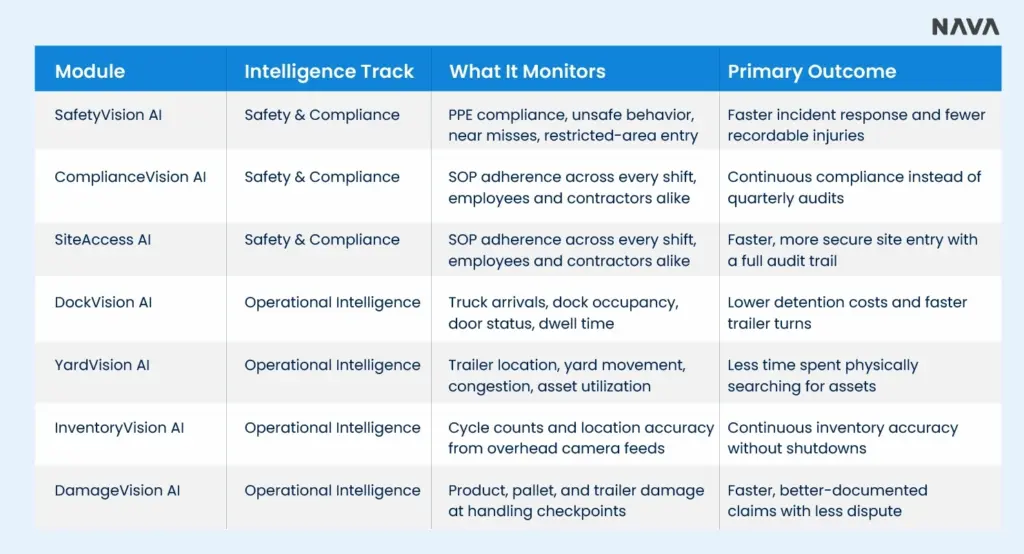
NAVA Vision AI is a computer vision system built around exactly those seven functions, organized into two tracks: Safety & Compliance Intelligence and Operational Intelligence.
It runs on the cameras already installed across production floors, docks, and yards, whether that infrastructure is cloud, edge, or hybrid, and turns that existing footage into structured, real-time intelligence instead of recordings nobody watches until after something goes wrong.
Rather than replacing a facility's cameras, NAVA converts what those cameras already see into event-driven alerts, dashboards, and audit trails that safety, dock, and supply chain leaders can act on the same shift. Here's what each module actually does, module by module.
SafetyVision AI continuously monitors workplace activity to identify safety risks, near misses, and unsafe behavior while work is happening, matching the real-time safety monitoring described above. Instead of waiting for an incident report, it watches every shift the same way and surfaces the risk while there's still time to act on it.
Key Capabilities
ComplianceVision AI replaces point-in-time audits with continuous visibility into how procedures are actually followed on the floor. Rather than sampling one shift a quarter, it watches every shift and gives compliance teams a running record instead of a snapshot.
Key Capabilities
SiteAccess AI automates truck access authorization, driver verification, and visitor management at every entry point. It replaces manual gate checks with a continuous, logged process, so the gate moves at the pace of traffic instead of the pace of a clipboard.
Key Capabilities
DockVision AI tracks truck arrivals, loading activity, and dwell time to surface exactly where dock operations slow down, turning bottlenecks into something visible in real time instead of something discovered in a postmortem.
Key Capabilities
YardVision AI continuously monitors trailer locations, yard movements, and asset utilization, replacing the hours teams spend physically locating trailers with a live view of the yard.
Key Capabilities
InventoryVision AI automates cycle counts and inventory location validation using the cameras already installed above the racks, with no shutdowns and no manual recounts required.
Key Capabilities
DamageVision AI automatically identifies product, pallet, and trailer damage, creating visual evidence for investigations and claims the moment damage occurs, rather than after a customer complaint surfaces.
Key Capabilities
The advantage of running all seven through one platform is that a single set of camera feeds ends up covering safety, compliance, dock throughput, yard visibility, inventory accuracy, and damage documentation at the same time, instead of stitching together seven separate point solutions.
In regulated industries, catching a problem is only half the job. You also have to prove what happened, when it happened, and what was done about it. Whether the pressure comes from an auditor, an insurer, or a regulator, a computer vision platform is only useful if it produces evidence that holds up. Three things matter most.
Audit trails. Every event, alert, and entry or exit should be logged with a timestamp and tied to a camera, zone, and shift. Look for a record of who acknowledged an alert and when, so the trail shows the response and not just the detection. This is the role Compliance Vision AI and SiteAccess AI play for SOP adherence and gate activity.
Retention. Continuous video raises real governance questions. A good platform lets you set retention periods by event type, so evidence is kept as long as your regulations or insurer require and not longer than necessary, with access controls on who can view it.
Documented evidence. A flagged event should come with photographic or video proof tied to a shipment ID, asset ID, or incident, and it should be searchable by date, zone, and event type. That is what turns a camera alert into something an auditor, insurer, or investigator can actually use, and it is the idea behind SafetyVision AI’s incident records and DamageVision AI’s claims documentation.
When evaluating vendors for a regulated environment, ask them to walk you through one flagged event from detection to exportable evidence. If that path is unclear, the audit trail probably is too.
A few questions help narrow down where to start:
Most facilities don't roll out all seven applications on day one. They start with the function causing the most pain, usually safety or dock throughput, prove the value, and expand from there.
That's the direction the industry is heading: fewer isolated point tools, and more unified platforms like NAVA Vision AI pulling every camera feed into one operational picture.
Computer vision, or machine vision, in manufacturing and logistics has moved well past quality inspection on the line. Safety monitoring, compliance tracking, gate access, dock visibility, yard management, inventory counting, and damage documentation are all running on the same underlying technology, just pointed at different problems.
The real shift isn't the AI model. It's connecting that model to the cameras a facility already has running.
That's the problem NAVA Vision AI was built to solve, turning existing camera infrastructure into continuous, real-time operational intelligence across safety, compliance, dock, yard, inventory, and damage, without a rip-and-replace of hardware that's already in place.
See What Your Cameras Are Already Missing
Book a Discovery Workshop and get a straight answer on where NAVA Vision AI fits your operations, no commitment required.
[ Book Your Discovery Workshop → ]
One call. One walkthrough of your floor, your dock, your yard. We map the highest-value use case for your existing cameras and show you exactly what it would catch on day one.


