Blog
AI Construction Site Safety Monitoring: What to Look for in a Vision AI Platform
By Satish· November 2, 2026· 12 min read
Summarize this post with

Loading insights...
LoadingSummarize this post with
Construction sites change every day, and manual checks can’t keep up. Vision AI turns your existing cameras into real-time safety alerts, but only if it’s accurate, fast, and proven on your own site. This guide shows what to look for, how to pilot it, and how to choose.
AI construction site safety monitoring matters because conditions change every day. Work zones move, new subcontractors arrive, and excavators swing through areas where crews were working an hour earlier. The person responsible for safety cannot watch all of it at once.
The cost of that gap shows up in the data. According to the Bureau of Labor Statistics Census of Fatal Occupational Injuries:
Manual inspections and periodic CCTV reviews miss most of what happens between checks. A safety walk at 9 a.m. says nothing about the worker who removed a hard hat at 2 p.m. Recorded footage often gets reviewed only after something goes wrong.
Vision AI closes part of that gap. It analyzes live camera feeds, identifies visible safety risks, and alerts the right person when intervention may be needed.
This guide covers:
Vision AI uses computer vision models to analyze CCTV footage frame by frame. The models are trained to recognize three kinds of things:
When a detection breaks a rule your team has configured, the platform generates an alert. A typical workflow looks like this:
| Stage | What Happens | Who Owns |
| 1. Camera feed | Existing CCTV or IP cameras stream video to the platform | IT/site infrastructure |
| 2. AI detection | Models identify people, PPE, vehicles, and zone boundaries | Vision AI platform |
| 3. Rule-based alert | A detection that breaks a configured rule triggers a notification | Platform, configured by safety team |
| 4. Safety team review | A supervisor checks the snapshot or clip and confirms the risk | Site safety manager |
| 5. Corrective action | The team intervenes, documents the event, and closes it out | Site supervisor / EHS team |
The real shift is timing. Reviewing footage after an incident tells you what went wrong. An alert during a developing risk gives your team a chance to step in before someone gets hurt.
Vision AI is a support layer, not a replacement. It does not substitute for trained safety professionals, guardrails, fall protection, traffic management plans, or your established safety procedures. The same approach applies beyond construction, as covered in our guide to AI workplace safety monitoring.
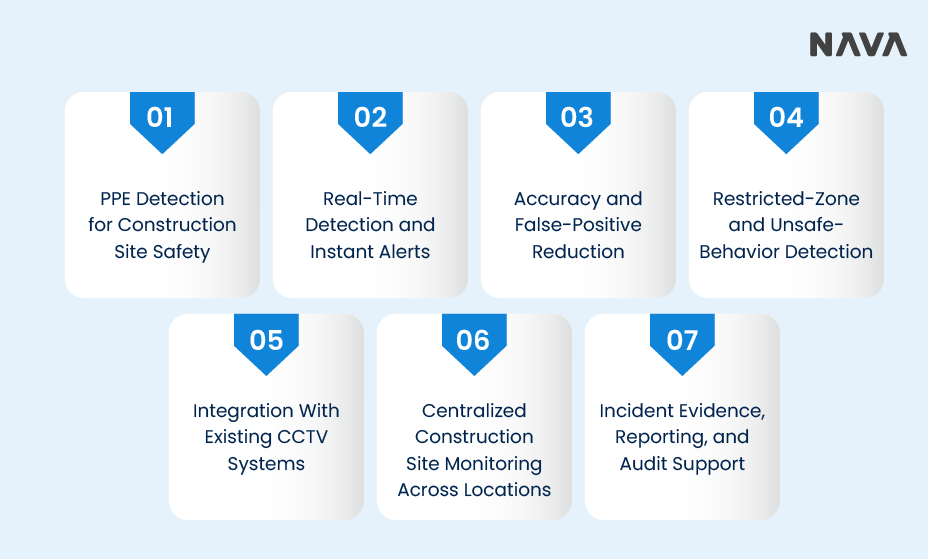
Many Vision AI platforms are not built for the conditions of an active construction site. Use these seven features as your evaluation baseline.
PPE detection is the most common starting point. Confirm which equipment the platform detects today, not what it could detect with future development.
An alert that arrives ten minutes late is a report, not an intervention. Ask the vendor to show end-to-end latency, from the moment a violation appears on camera to the moment a supervisor is notified.
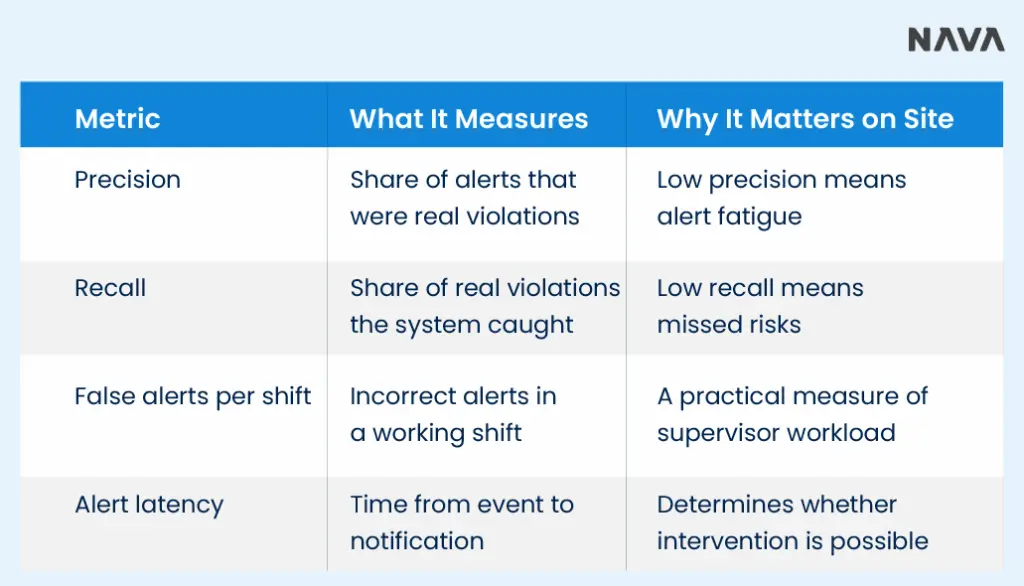
False alerts are the fastest way to lose your team’s trust. Once supervisors start ignoring notifications, the system stops protecting anyone.
Many serious construction incidents involve people in the wrong place at the wrong time. Zone and behavior detection addresses that risk directly.
Replacing cameras across a site adds cost and delays deployment. A platform that works with your current infrastructure is faster to test and cheaper to scale.
General contractors and developers rarely run one site at a time. Central safety teams need a single view across projects.
A detection is only useful if it leaves a usable record. That evidence supports investigations, toolbox talks, and contractual or regulatory documentation.
A polished vendor demo shows what a platform can do on curated footage. A pilot shows what it does on your site, with your cameras, under your conditions.
| Pilot Element | Weak Approach | Strong Approach |
| Footage | Vendor sample videos | Your cameras, your site, live or recorded |
| Success criteria | Decided after seeing results | Written and agreed before kickoff |
| Duration | A single day | Long enough to cover shifts, weather, and work phases |
| Reviewers | Executives only | Safety managers and frontline supervisors |
Shortlist platforms against your site’s requirements rather than the length of a feature list. These factors should drive the decision:
| Factor | Questions to Answer |
| Site size and camera count | How many cameras and zones need coverage now and at peak? |
| Priority hazards | Which risks and safety rules matter most on your projects? |
| CCTV and network infrastructure | Can current cameras and bandwidth support AI analysis? |
| Alert response times | How fast must a supervisor be notified to intervene? |
| Reporting and integration | Do you need links to EHS, project, or incident management systems? |
| Data privacy and retention | What do local law, labor agreements, and client contracts require? |
| Cost, training, and support | What are deployment, licensing, training, and ongoing support costs? |
The lowest-cost option is rarely the best value if it misses critical areas, generates excessive false alerts, or requires new cameras. Judge total cost against detection quality, coverage, and fit with existing systems.
Vision AI platforms used for construction safety include viAct, Intenseye, Protex AI, and NAVA Vision AI. Their detection coverage, deployment models, and pricing differ, so evaluate each against your own site requirements. NAVA Vision AI is covered in more detail below, including how its capabilities map to the criteria in this guide.
NAVA Vision AI meets these requirements through SafetyVision AI, its worker safety solution, available on AWS Marketplace. It runs on the CCTV and IP cameras a site already has, so teams can test AI monitoring without replacing hardware.
Here is how NAVA’s listed capabilities map to common construction safety challenges:
| Construction Challenge | NAVA Vision AI Capability |
| Missing PPE across changing crews | Real-time PPE detection for helmets, vests, gloves, and boots |
| Workers entering hazardous areas | Restricted-zone monitoring based on site hazard maps |
| Unsafe actions between inspections | Unsafe behavior recognition, including climbing, running, and phone use |
| Incidents that almost happened | Near-miss event detection |
| Slow response to developing risks | Real-time supervisor alerts and dashboards |
| High cost of new camera infrastructure | Deployment on existing CCTV/IP cameras |
| Connectivity and data requirements | Cloud or edge deployment using AWS or NVIDIA |
| Investigations and audits | Audit logs and recorded evidence for each event |
A NAVA Vision AI engagement follows four steps:
For teams that want evidence before commitment, NAVA Vision AI offers a zero-cost proof of concept on AWS Marketplace. You can use it to run the pilot framework above on your own footage and judge the results against your own acceptance criteria.
Bring these questions to every vendor conversation, and ask for answers in writing where possible. For a broader view of what to check across industrial sites, see our guide to AI for workplace safety.
| Question | What a Good Answer Includes |
| Which safety violations can the platform detect today? | A specific, written list, separate from roadmap items |
| Can it work with our existing CCTV infrastructure? | Supported protocols, resolution needs, and any added hardware |
| How is detection performance validated in real construction environments? | Metrics, definitions, and the conditions behind them |
| Can safety rules adapt to different zones and changing layouts? | Self-service rule and boundary editing |
| What incident evidence and reports are available? | Snapshots, clips, timestamps, and exportable reports |
| How does the platform handle privacy, retention, and access? | Retention periods, storage location, and role-based permissions |
| What does deployment require in cost, hardware, training, and support? | A full cost breakdown and support terms |
| Can we run a pilot against our own safety scenarios first? | A defined pilot scope with agreed success criteria |
The right Vision AI platform does three things well:
It should also work with your existing cameras, produce usable evidence, and prove itself in a pilot with measurable results.
Feature count is not the measure. What matters is how well the platform fits your hazards, your workflows, and your infrastructure.
If you are assessing Vision AI for construction safety, put NAVA Vision AI on your shortlist. Explore NAVA’s Vision AI platform or request a demonstration to see how it performs on your construction site.
It uses computer vision to analyze construction site camera feeds and detect safety risks such as missing PPE, restricted-zone entry, and unsafe behavior. The system alerts safety teams so they can intervene while a risk is developing.
Many platforms, including NAVA Vision AI, work with existing CCTV and IP cameras. Compatibility depends on camera resolution, placement, video protocols, and network capacity, so confirm requirements during evaluation.
No. Vision AI extends what safety teams can see, but trained professionals still review alerts, make decisions, and enforce procedures. Physical safeguards and safety programs remain essential.
Run a pilot on your own footage with predefined scenarios and acceptance criteria. Measure precision, missed detections, false alerts per shift, and alert latency across different shifts and conditions.
Hard hats and high-visibility vests are the most widely supported. Some platforms also detect gloves, boots, and other equipment, so ask each vendor for a confirmed list.


